
1. Who are the Homeowners’ Association (HOA) members?
The Homeowners Association (HOA) consists of all the estate’s property owners (members). Buyers agree to become members of the HOA when they sign the agreement of sale and become members of the HOA when their property registers in their names. It is compulsory.
2. What does the HOA do?
The HOA is responsible for general upkeep and maintenance of the estate and its common property (access control, security and security equipment, perimeter fence, parks, and sidewalks). They appoint and manage service providers, e.g. garden services and security providers. They must ensure that the residents adhere to the estate’s conduct rules and municipal by-laws and that owners keep to the estate’s design and aesthetic standards. Lastly, they manage the estate’s finances by managing the budget and collecting compulsory members’ contributions (levies).
3. Why should I attend HOA training?
HOA training is an opportunity to meet the estate manager and understand the basics of the HOA setup. Residents are also free to ask questions during this session to clear up any uncertainties.
4. What is a Memorandum of Incorporation (MOI)?
The HOA is structured as a non-profit company (NPC). The Memorandum of Incorporation (MOI) is the constitution of this non-profit company. These rules govern the company’s conduct (such as meetings, voting rights, etc.). The MOI also sets out its members’ and directors’ rights, duties, and responsibilities.
5. What are Lion Pride’s conduct rules?
Conduct rules set out general guidelines to members for good neighbourly conduct. Each owner is responsible for reading, knowing and following the estate’s conduct rules. Click the Downloads menu option to view Lion Pride’s conduct rules.
6. What does the managing agent do?
The managing agent is an independent contractor appointed by the HOA to help manage the finances (collection of levies and payment of bills), HOA meetings (arranging meetings, taking and distributing minutes) and general HOA administration.
7. What are levies, and what are they used for?
Members’ compulsory monthly contributions towards the HOA funds are called levies. These collected levies belong to all the members of the HOA and may only be used for HOA expenses. Levies are determined by the annual budget as determined by all the members present at the annual general meeting (AGM). Special levies can be determined occasionally when unexpected expenses arise that were not budgeted for. Levies are payable on the first day of every month (no automatic grace period). If members do not pay their levies on the first day of the month, they will be in arrears. A collection process will begin, and collection charges will apply.
8. Who manages the HOA?
The HOA is managed by a board of directors whose responsibilities are set out in the MOI. During the development period, the developer has the majority of directors on the HOA board, after which the developer exits entirely and will no longer have directors on the board.
9. What happens at the HOA’s annual general meeting (AGM)?
An annual general meeting (AGM) is held once a year, where the HOA directors report back to their members on the financial state of the HOA and set the budget for the next 12 months. At the AGM, appointments of service providers as well as directors are also confirmed.
10. When does the development period start and end?
The development period starts when the developer begins selling properties and ends when the developer has sold the last property in the estate. During the development period, the developer has the majority of directors on the HOA board and the majority votes at any HOA meeting.
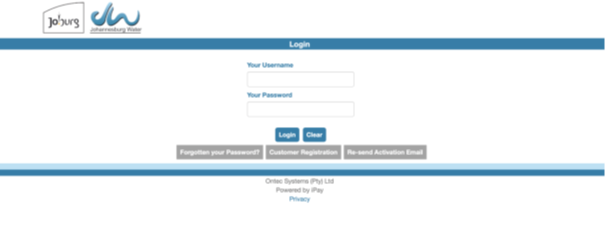
Kindly use the following link to register on the Johannesburg Water website: https://jwater.ontec.co.za/index.html.
Step 1: Register on the website.
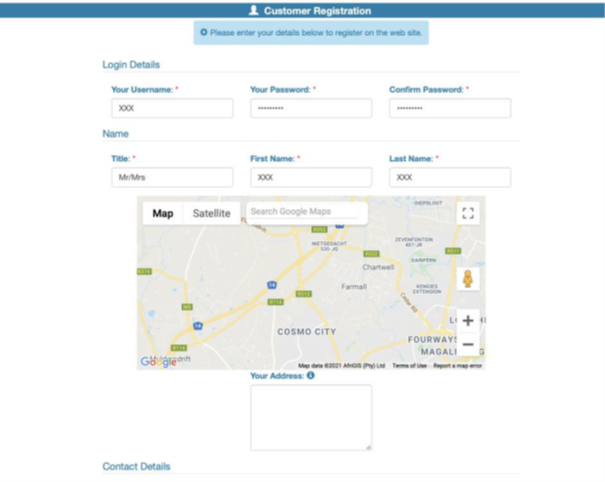
Step 2: Complete all fields of information required.
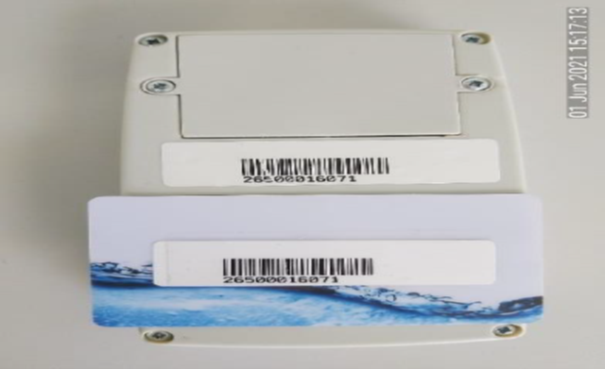
Step 3: Register your selected meter.
The meter number will appear on the back of your water meter keypad or the back of your supplied water meter card.
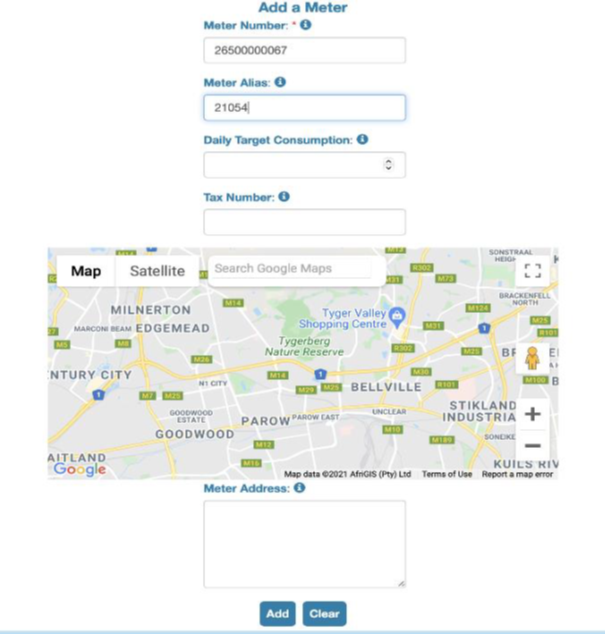
Step 4: Select add once meter information has been completed.
Use your stand number as the meter alias.
Step 5: Confirm meter information.
Note some meters will still be registered in the developer’s name, do not worry. This will not affect you; once a phase is completed, all units’ ownership will be changed to the owners on the JHB Water system.
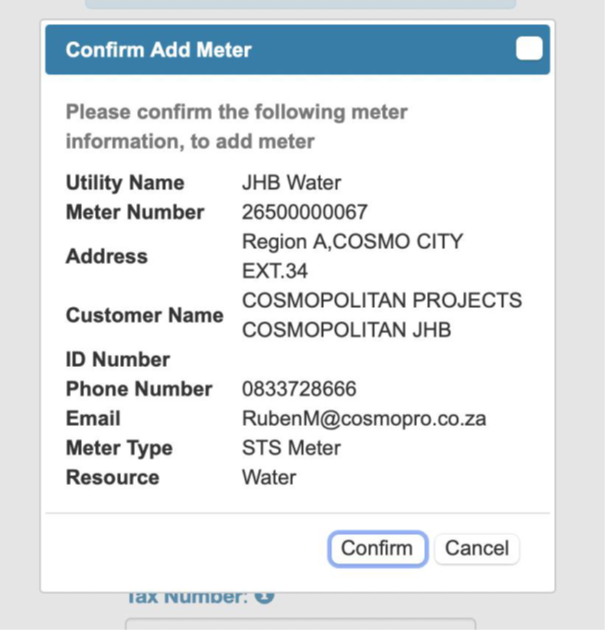
Step 6: Confirm registration.
– The system will take you to the login homepage once your meter has been confirmed.
– You will receive an email asking you to confirm registration; please click on activate account.
– This will redirect you to the homepage once again, and you will then be able to log into the JHB water vending system.
Step 7: Meter will be located on homepage.
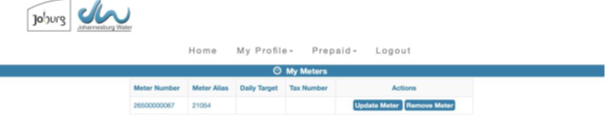
Step 8: Purchase water resources.

Step 9: Complete all fields.
Note, only use “SID Instant EFT”.
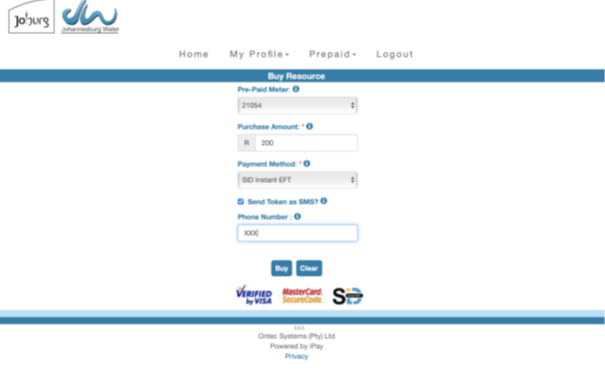
Step 10: Complete purchase.
– The system will redirect you to a new page, this is the online banking system, please follow steps to complete purchase.
– Once purchase is completed, give the system +/- 15 min to confirm payment.
– Once payment is confirmed proceed to step 11.
Step 11: To view token.
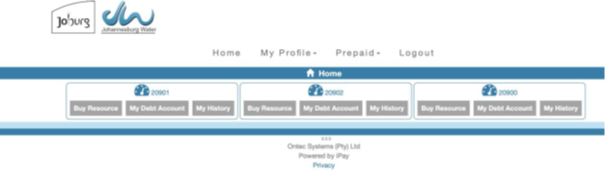
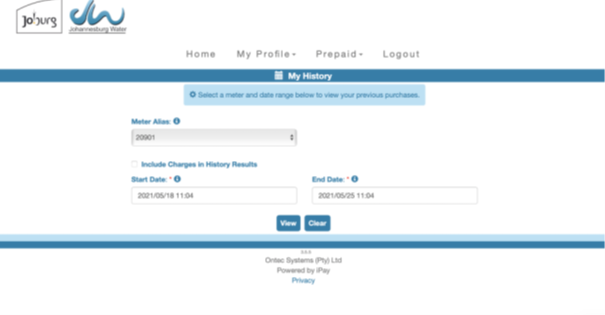
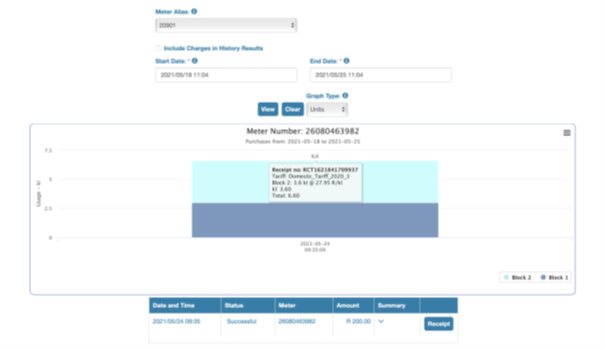
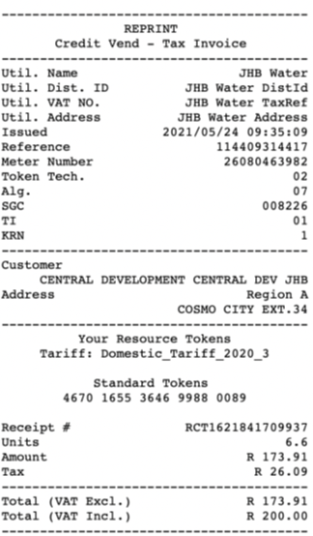
Step 12: Use token on receipt to load water into keypad.
In some instances, the receipt will have two tokens; you can utilise both tokens.
- Prepaid electrical meters: Please note the prepaid electrical meter supplied within the handover box has already been paired and connected to the Eskom meter. If your units are depleted, your power will turn off. It is strongly advised to load electricity before your power is depleted.
- Loading procedure:
- Use the meter number as indicated on the Eskom card.
- You can purchase electricity on any banking app or at any local store.
- The purchased electricity will provide you with a token number.
- Kindly note that to input the token number on your prepaid meter’s keypad, your unit’s distribution box (DB) plug breakers need to be switched on, and the meter’s plug must be plugged into a wall socket.
- If the meter does not switch on automatically after plugging into the wall socket, press and hold the enter button on the keypad. The keypad will indicate “Search Pan” and specify the available electricity units. Input the new token number into your keypad.
- Units will automatically be loaded onto your meter, and the new units will be displayed.
- Enjoy your electricity!
Pikitup collects refuse weekly on Tuesdays, please ensure all bins are taken outside by 07:00.
- Estate Manager refers the client to the council.
- Require title deed, Windeed Search and certified ID copy not older than three months.
Contact the estate manager, Johannes Mabusela on 074 557 6357 or estatemanager6@csimanagement.co.za.
He registers all fingerprints in the estate manager container.